What is Private Label SEO? How is it Different From White Label SEO?
What is Private Label SEO? How is it Different From...
Read More →
A client doesn’t judge your reporting tool by its feature list. They judge it by whether the dashboard looks like yours, loads reliably, and shows numbers they can trust.

Awhite label SEO dashboardis a client-facing view of SEO performance that carries your agency’s brand, not the reporting tool’s, usually with your logo and colors, and in some tools, your own domain and email sender. The ten tools compared here are AgencyAnalytics, BrightLocal, DashThis, Databox, Nightwatch, Reporting Ninja, SE Ranking, Semrush, Swydo, and Whatagraph. They are a verified shortlist in alphabetical order, not a tested ranking, and Data Studio is covered separately as a free customizable option.
Methodology:This guide draws on each vendor’s own public pricing, white label, or documentation pages, plus Google’s Data Studio documentation and release notes. Everything is reported as “according to its website” and was not independently tested, so treat feature and price statements as vendor claims. Inclusion verifies that public documentation exists. It does not mean Growzify independently tested uptime, connector reliability, data accuracy, support quality, security controls, or the client experience.
A white label dashboard replaces the reporting tool’s identity with yours. The client sees your logo, your colors, and ideally a link on your own domain, so the tool stays in the background. When setting upwhite label SEO reporting, remember that “white label” isn’t one single feature. It’s a stack of separate ones, and tools differ on each:
A tool can do some of these and not others, which is why the comparison matrix below separates them. A dashboard is also only a reporting layer. It doesn’t create the data, which comes from sources such as Search Console and Analytics.

“White label” should not be treated as one yes-or-no feature. When evaluatingwhite label link buildingoptions or reporting tools, it is more useful to sort platforms into three levels:
The agency can remove the vendor’s identity from the main client-facing experience and use its own branding across reports or dashboards. Depending on the platform, this may also include a custom domain, branded sender email, and client portal.
The agency can add its logo, colors, headers, or other brand elements, but some vendor identity, URLs, login experiences, or product limitations remain.
The tool can be styled into a professional client-facing dashboard but does not document a complete vendor-removal or custom-domain white label experience.
This distinction matters because two platforms can both advertise “branding” while giving the client very different experiences.
This distinction matters because two platforms can both advertise “branding” while giving the client very different experiences. Building a propertechnical SEO checklistmeans evaluating at least six separate capabilities: logo and colors, vendor removal, custom domain, branded email, client portal, and client login experience.
We looked for tools that meet four tests:
Some well-known tools were left out because their pages didn’t describe white labeling clearly. Reporting Ninja was left out of an earlier version of this guide for that reason. Its current pages now describe a client portal on your own domain, branded PDFs and share links, and a brand template covering logo, colors, fonts, and cover page, so it is in this version.
Being on this list doesn’t mean a tool performs better than the ones left out. It means the vendor’s pages gave enough public detail to compare. What a vendor says about itself isn’t proof of reliability, so the sections on testing and setup matter more than any single feature claim.
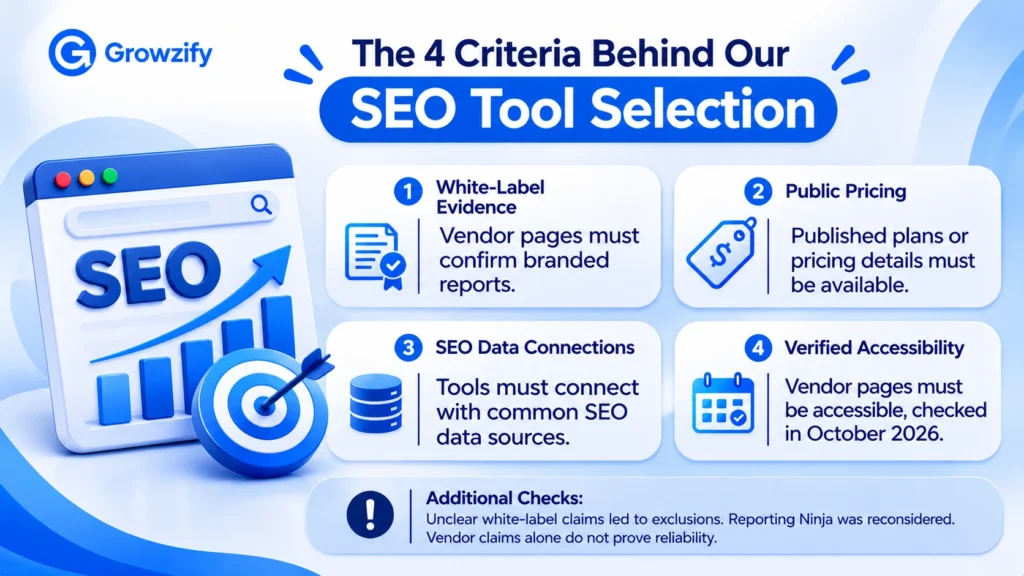
The order is alphabetical, not a ranking.
The shortlist includes both fully branded client-facing platforms and tools with partial branding. Not every product offers complete vendor-brand removal, a custom domain, or a dedicated client portal. Compare those capabilities separately rather than treating all ten as equivalent.
| Tool | Primary fit | Pricing shown |
| AgencyAnalytics | Agency client reporting | $20 per client per month (annual billing) |
| BrightLocal | Local SEO reporting | From $31 per month per location (annual billing); white-labeling listed on Track, Manage, and Grow |
| DashThis | Dashboard-based reporting | From $44 per month (yearly billing) |
| Databox | Metrics and dashboards | Plans from $0; branding add-on $80 per month |
| Nightwatch | Rank tracking plus reporting | From €79 per month |
| Reporting Ninja | Reporting with a client portal | From $20 per month (annual billing) |
| SE Ranking | SEO suite with agency add-on | Agency Pack add-on from $69 per month (annual billing only), on top of a base plan |
| Semrush | SEO suite with report add-on | Pro report $20 per month per report |
| Swydo | Flat-plan reporting, unlimited clients | €69 per month, 10 data sources included |
| Whatagraph | Reporting for larger agencies | Max from €699 per month (annual) |
Legend:Yesmeans the vendor’s page names the capability.Limitedmeans it is named with a condition.Verifymeans I did not see it stated on the pages I read, so ask the vendor.
| Tool | Logo and colors | Vendor removal | Custom domain | Branded sender | Client portal | Billing unit |
| AgencyAnalytics | Yes | Yes | Yes | Yes | Yes | Per client |
| BrightLocal | Yes | Yes | Verify | Yes | Yes | Per location, by plan |
| DashThis | Yes | Limited | Yes | Yes | Verify | Dashboard bundle |
| Databox | Yes (add-on) | Yes (add-on) | Yes (add-on) | Verify | Verify | Plan plus add-on |
| Nightwatch | Yes (Professional and up) | Verify | Verify | Verify | Verify | Plan |
| Reporting Ninja | Yes | Verify | Yes | Verify | Yes | Reports and accounts |
| SE Ranking | Yes | Yes | Yes | Yes | Limited | Base plan plus add-on |
| Semrush | Yes (Pro) | Yes (Pro) | Yes (Pro) | Verify | Verify | Per report |
| Swydo | Yes | Yes | Yes | Yes | Verify | Flat plan plus data sources |
| Whatagraph | Yes | Verify | Limited | Verify | Verify | Plan |
Few vendor pages describe what the client sees on the login page, so treat that sixth capability as something to test.
Based on what the vendors’ pages say, my reading is that AgencyAnalytics, Reporting Ninja, SE Ranking, Semrush Pro, and Swydo document the fullest branding, and DashThis does when its custom domain is active. BrightLocal, Databox, Nightwatch, and Whatagraph show partial branding or conditions to confirm. This is a reading of vendor pages, not a tested classification.
According to itspricing page, AgencyAnalytics charges $20 per client per month on annual billing, with no monthly-billing price listed. The page notes a 20% annual saving and discounted pricing for 25 or more clients through sales.
BrightLocal’swhite label pageis aimed at local SEO. It describes custom logos, colors, and messaging, a custom-branded client portal, and no BrightLocal branding on shared reports.
DashThis’spricing pageshows four plans: Individual at $44 per month billed yearly (3 dashboards), Professional at $139 (10), Business at $279 (25), and Standard at $429 (50 up to 1,500+).
Databox’s pricing pagelists a Free plan, an Analyst plan at $71 per month, Team plans at $199 and $319, and an Agency plan at $79 plus account packs, all billed annually.
Nightwatch’s pricing pageshows Starter at €79 per month, Professional at €159, Agency at €399, and an Enterprise tier priced by volume.
Reporting Ninja’s pricing pageshows four plans, each with every feature and integration. Starter is25permonth(22 quarterly, $20 annual) for 10 reports and 10 accounts of each type. Small is50(40 annual) for 30 reports; Medium is88(70 annual) for 70, and Large is150(120 annual) for 150. Users are unlimited, a custom plan is available, and there is a 15-day free trial with no credit card.
SE Ranking’s white label pagesays white labeling is part of its Agency Success Kit, starting at $69 per month with an annual subscription. Itspricing pagelists the Agency Pack as an add-on at +$69 per month, annual billing only.
Semrush offers white labeling through its My Reports product. According to itsMy Reports help page, a Base report is $10 per month per report and a Pro report is $20 per month per report.
Swydo’s pricing pageshows one plan at €69 per month (€62 billed annually), with unlimited clients, users, dashboards, and reports. Extra data sources cost €4.50 each from the 11th source, falling at higher volumes.
Whatagraph’s pricing pageshows two plans: Max from €699 per month billed annually, and Prime at custom pricing.
Data Studio is Google’s reporting tool. Google’s release notes say Looker Studio was rebranded as Data Studio on April 16, 2026, so older guides may use the Looker Studio name. It has a no-cost self-service tier and a paid Pro tier.
It is not on the ten-tool list because it is a customizable reporting layer, not a full white label platform. Data Studio is a useful no-cost reporting layer for agencies that need branded colors, layouts, and client-ready dashboards. But Google’sembedding documentationsays embedded reports always include the Data Studio watermark, and we found no documented first-party custom-domain feature.
Google’s sharing documentation describes inviting people or groups, link sharing, and scheduled PDF emails. Themes let you match colors.
Best fit: a low-cost starting point for agencies that mainly need a clean, client-ready view, and that do not need full vendor removal or a custom domain.
These tools bill on different units, so the headline numbers aren’t directly comparable:
A headline monthly price is not comparable until the billing unit is normalized to your agency’s client and data-source model.
Three points stand out:
Use the formula that matches each tool’s billing unit.
| Billing model | Formula |
| Per client | clients × price per client + add-ons |
| Dashboard bundle | required dashboard tier + add-ons |
| Data source | base price + billable connected sources |
| Per report | paid reports × report price |
| Report and account limits | smallest plan whose report and account limits cover your roster |
Then compare the effective monthly cost:
Base plan + required white-label add-on + client, report, dashboard, or data-source volume + required SEO, AI, or rank-tracking add-ons
A $69 white-label add-on, for example, is not a $69 reporting stack if the underlying plan is also required. Model your expected client count 12 months from now, not just today’s account count.
| Your situation | What to look for |
| A few clients, simple needs, tight budget | A free or low-cost reporting layer such as Data Studio, with manual commentary, when full vendor removal and a custom domain are not required |
| A steady roster that grows client by client | Per-client pricing with full branding included, so cost tracks revenue |
| Many clients and many data sources | A flat or plan-based price with a clear data-source policy |
| Mostly local SEO clients | A tool built for local reporting, such as one with a client portal for local rankings and citations |
| Already paying for an SEO suite | The suite’s own white label add-on, if it covers the views your clients need |
| A larger agency with many data sources and stakeholders | A higher-tier platform with custom domain, scheduling, and governance controls |
Don’t rely on a vendor’s marketing page for these. Test each with a trial account:
Trial a controlled test account first. Connect a real client account only after reviewing permissions, privacy, and contractual requirements.
A tool is only as useful as the numbers you put in it. A clear dashboard separates four layers:
Delivery → Technical and Search State → Search Performance → Business Performance
Name the source of every number, use matching date ranges, and don’t present preliminary data as final. The tool should visualize these layers. It should not collapse them into one proprietary “SEO score.”
A chart showing that organic traffic and leads rose in the same period does not by itself prove the reported SEO work caused the increase.
Growzify’s guide to thewhite label SEO reporting structurecovers layout and cadence in depth.
| Option | How the displayed price applies | Illustrative monthly cost |
| AgencyAnalytics | 8 clients at $20 each, annual billing | $160 |
| Swydo | €62 annual-billing plan covering 10 sources, plus 14 more at €4.50 each | €125 (assumes the extra-source charge isn’t discounted for annual billing; €132 on monthly billing at €69) |
| DashThis | Professional plan covers 10 dashboards, annual billing | $139 |
| Reporting Ninja | Starter plan covers 10 reports and 10 accounts of each type, annual billing | $20 (assumes eight accounts of each type fit the limit) |
A white label dashboard touches client accounts, so set it up with care:
Growzify’swhite label SEO quality control checklistcovers how to review a report before it reaches a client. For the wider delivery workflow, see Growzify’s guide to the backend SEO systems agencies use to scale, and for keeping clients, its guide onclient retention with outsourced SEO.
It’s a client-facing view of SEO performance that carries your agency’s brand instead of the reporting tool’s. Depending on the tool, that can include your logo, colors, domain, and email sender.
A fully white-label SEO dashboard should be evaluated across several separate capabilities: agency logo and colors, removal of the software vendor’s identity, a custom client-facing domain, branded report emails, client-specific portal access, and the login experience. A tool can support some of these without supporting all of them, so “white label” should not be treated as one yes-or-no feature.
It’s a client-facing view of SEO performance that carries your agency’s brand instead of the reporting tool’s. Depending on the tool, that can include your logo, colors, domain, and email sender.
A fully white-label SEO dashboard should be evaluated across several separate capabilities: agency logo and colors, removal of the software vendor’s identity, a custom client-facing domain, branded report emails, client-specific portal access, and the login experience. A tool can support some of these without supporting all of them, so “white label” should not be treated as one yes-or-no feature.
No independent data proves one tool is best. This guide lists ten with public white label or agency features in October 2026. The right one depends on your client count, data sources, billing preference, and how much branding you need.
Compare the billing unit against your own operating model. Some tools charge per client, some per dashboard, some per report, and others by connected data source, by report and account limits, or by a base plan plus a white label add-on. Calculate the effective cost for your expected client and data-source count rather than comparing headline starting prices.
Not always. A custom domain makes the dashboard feel like yours, but some agencies are comfortable with branded logos and colors alone. If a custom domain matters, confirm it’s included in your plan, since some tools offer it only on certain plans or as an add-on.
Data Studio has a no-cost self-service tier and can be styled with themes. However, Google documents a persistent watermark on embedded reports, and we found no documented custom-domain option, so it is a customizable reporting layer, not a full white label platform. Paid tools add branding controls, scheduling, and client portals.
Among the ten here, displayed prices range from tens of dollars a month to several hundred, depending on the billing unit and plan. The units differ (per client, per report, per dashboard, flat, or by report and account limits), so compare cost against your own client and data-source counts.
They shouldn’t. Look for client-specific logins and role-based access, and test that a client view shows only that client’s data.
Show work delivered, technical and search state, search performance, and business outcomes, with each number’s source named and consistent definitions.
If you’d rather have SEO delivery and reporting data that drop cleanly into your own branded dashboards, Growzify’swhite label SEO servicesteam can walk you through how that works.
No independent data proves one tool is best. This guide lists ten with public white label or agency features in October 2026. The right one depends on your client count, data sources, billing preference, and how much branding you need.
Compare the billing unit against your own operating model. Some tools charge per client, some per dashboard, some per report, and others by connected data source, by report and account limits, or by a base plan plus a white label add-on. Calculate the effective cost for your expected client and data-source count rather than comparing headline starting prices.
Not always. A custom domain makes the dashboard feel like yours, but some agencies are comfortable with branded logos and colors alone. If a custom domain matters, confirm it’s included in your plan, since some tools offer it only on certain plans or as an add-on.
Data Studio has a no-cost self-service tier and can be styled with themes. However, Google documents a persistent watermark on embedded reports, and we found no documented custom-domain option, so it is a customizable reporting layer, not a full white label platform. Paid tools add branding controls, scheduling, and client portals.
Among the ten here, displayed prices range from tens of dollars a month to several hundred, depending on the billing unit and plan. The units differ (per client, per report, per dashboard, flat, or by report and account limits), so compare cost against your own client and data-source counts.
They shouldn’t. Look for client-specific logins and role-based access, and test that a client view shows only that client’s data.
Show work delivered, technical and search state, search performance, and business outcomes, with each number’s source named and consistent definitions.
If you’d rather have SEO delivery and reporting data that drop cleanly into your own branded dashboards, Growzify’swhite label SEO servicesteam can walk you through how that works.

Chitranshu SharmaA growth strategist, digital marketing consultant, and the founder of Growzify, a performance-driven agency helping brands dominate search, shape perception, and build sustainable online visibility. With 8+ years of hands-on experience in Enterprise SEO, Online Reputation Management (ORM), and AI-led traffic generation, Chitranshu has helped startups, public figures, SaaS companies, and cannabis brands outrank competitors — ethically and at scale.

At Growzify, we are dedicated to helping your business achieve its goals. Are you Ready to take the next step?
What is Private Label SEO? How is it Different From White Label SEO? Ask five...
The Complete Guide to White Label SEO Onboarding for Agencies and Resellers A lot of...
What is White Label SEO Reporting: Tools, Metrics, and Best Practices A report can look...
How SEO Outsourcing for Startups Helps in Driving Organic Growth A startup rarely has enough...

How Much Does SEO Outsourcing Cost in 2026? Nobody can give you one honest price...
AI SEO Best Practices to Boost Visibility Across LLMs Large language models do not all...

7 AI SEO Content Optimization Strategies to Improve Visibility on AI Search Platforms AI-powered search...
How to Outsource SEO Without Losing Your Rankings Rankings don’t vanish because someone else is...
Call Now





Growzify digital team is very effective, and easy to work with. Very strong communication and always up for suggestions. Saw 300% growth in web traffic 170% growth in revenue through Facebook ad’s & Amazon. I recommended them to my fellows and they turned their online business into a money making machine.