How to Outsource SEO Without Losing Your Rankings
How to Outsource SEO Without Losing Your Rankings Rankings don’t...
Read More →

Rankings don’t vanish because someone else is doing the work. They vanish when something breaks and nobody notices in time.

Outsourcing SEO without losing your rankings means hiring an outside agency, freelancer, or partner to do SEO work while you keep control of the things that protect your rankings: your accounts and data, your URLs and content, approval and validation of site changes, and regular monitoring. When ranking losses are connected to an outsourcing transition, common preventable causes include unreviewed site changes, missing redirects, lost access, risky methods, and failures that go unnoticed because monitoring or handover controls are weak. Rankings can also move for reasons unrelated to the provider.
Growzify’s SEO outsourcing protection system has seven steps:
Methodology: This guide draws on Google Search Central’s guidance on hiring an SEO, its site-move documentation, its HTTP status code documentation, its spam policies, and Search Console Help on permission levels and the Performance report, alongside recurring patterns Growzify sees when businesses and agencies outsource SEO. Google doesn’t publish statistics on ranking loss caused by outsourcing, so the risk list, the checks, and the timing suggestions are practitioner judgment, not Google rules. The example is illustrative, not a real client case.
Outsourcing doesn’t hurt rankings on its own. But it adds new ways for things to go wrong, because more people can touch your site and fewer people watch it closely.
Here are the six risks we see most often, and where each one is handled in this guide.
| Risk | How it happens | Safeguard |
| Unreviewed site changes | A settings or template change blocks or hides pages by mistake | Change control (Step 3) |
| URL changes without a plan | Pages move, merge, or get deleted with no documented decision, so old links lead to errors or irrelevant pages | URL disposition plan (Step 4) |
| Lost access or ownership | Core accounts are set up in the provider’s name | Own your accounts (Step 2) |
| Risky tactics | Link schemes meant to manipulate rankings, mass-made pages, or misleading content | Method transparency (Step 5) |
| Silent decline | Nobody watches the numbers until traffic has already fallen | Monitoring (Step 6) |
| Messy handover | A new provider starts changing things before learning the site, or assets go missing | Exit plan (Step 7) |
Before your provider touches the site, record where things stand. This is your baseline. Without it, it becomes much harder to tell what changed, when it changed, and whether the timing fits an implementation, a migration, a content update, or a wider movement in search.
A baseline supports diagnosis. It doesn’t by itself prove that the provider caused a later gain or decline.
Save these items:
Keep it all in a shared folder you own. Growzify’s SEO outsourcing checklist covers full handoff preparation, including goals and budget, so this guide stays focused on protecting what you have.
Your accounts hold your history. If core accounts are controlled by the provider, you can lose access to historical data, configuration, or continuity when the relationship ends.
Make sure you own:
Give your provider the lowest access that lets them do the job. Search Console’s permission levels help here:
| Level | What it allows |
| Owner | Full control, including adding and removing users |
| Full user | View all data and take some actions |
| Restricted user | Simple view rights on most data |
Google also advises that if an SEO offers to do an audit, you should only grant read access to Search Console at that stage, not write access.
Use individual accounts for each person, not shared logins. Turn on multi-factor authentication where it’s supported, grant only the permissions each role needs, and revoke access promptly when roles change.
This is Growzify’s practitioner list, not a ranked study. It’s based on patterns we see, so your own risks may differ.
Rankings can also move for reasons that have nothing to do with a provider, such as competitors, changes in demand, search-system updates, changes to the results page, and seasonality. The goal of this guide is to control the preventable risks, so that when a drop happens you can tell which kind it is.
One thing Google is clear about: no one can guarantee a #1 ranking. Google’s guidance on hiring an SEO tells site owners to beware of SEOs who guarantee rankings or claim a special relationship with Google. So the goal isn’t a promise. The goal is to avoid losing what you already have while you build more.

Many ranking drops come from a change that looked small. A setting is flipped. A template is updated. A page is set to “noindex.” Nobody checks.
Change control stops that. It doesn’t need to be heavy. Match the level of review to the risk.
| Change type | Examples | Suggested approval |
| Low risk | Editing a blog post, adjusting a page title | Provider proceeds, change is logged |
| Medium risk | Template edits, new internal link blocks, schema changes | Your team reviews before release |
| High risk | URL changes, robots.txt, canonicals, redirects, sitewide noindex changes, large-scale template changes, rendering or JavaScript architecture changes, CMS or platform moves, domain or subdomain migrations | Written approval, testing, and a rollback plan |
This table is a Growzify practitioner suggestion. Adjust it to your site.
For material changes, track four separate states: recommended, approved, implemented, and validated. A provider saying “redirect recommendations delivered” is not the same as the redirects being implemented correctly.
A recommendation isn’t a production change, and a production change isn’t complete until it has been validated.
Before any medium or high-risk change goes live, run a quick check:
Ask for a change log. It should say what changed, when, why, and who approved it. Growzify’s guide on managing outsourced SEO for long-term results covers review habits in more depth.
Protecting SEO during outsourcing doesn’t mean redirecting every URL that disappears. It means that no important URL should be deleted, merged, or moved without a documented disposition plan.
Before an important URL changes, record what should happen to it:
| Disposition | What to do |
| Moved | Use a permanent redirect to the new version |
| Merged | Redirect to the genuinely relevant consolidated page |
| Replaced | Redirect to the closest appropriate replacement |
| Permanently removed, no replacement | Let the URL return an appropriate 404 or 410, rather than sending users to an unrelated page |
| Unchanged | Keep the URL unless there’s a justified reason to change it |
If a URL changes, map it to the most relevant replacement with a permanent redirect. If content has been intentionally removed and there’s no genuinely relevant replacement, a 404 or 410 can be better than redirecting people to an unrelated page. Google treats these 4xx responses as a signal that the content doesn’t exist, and stops using the URL over time.
Google’s site-move documentation gives clear rules for URLs that do move:
Google also says to expect temporary ranking fluctuation during a move while it recrawls and reprocesses your site. So a short wobble after a planned move isn’t automatically a failure. A lasting drop, or a drop linked to errors, needs investigation.
The control isn’t “every old URL must redirect.” It’s “no important URL changes without a documented disposition and validation plan.”
This is an illustration, not a real client case. A furniture retailer, “Harbor & Pine,” hires a provider who decides to shorten category URLs to look cleaner. The provider updates the site but doesn’t build a redirect map.
Soon after, the old category links return errors. Pages that used to bring in visitors stop doing so. The retailer notices only when sales fall.
The fix is the same steps above, done late. Build the map, add the redirects, test them, and watch Search Console. With change control in place, the missing disposition plan would have blocked the release.
Some tactics can hurt rankings, and the risk lands on your site, not the provider’s. Google’s hiring guidance is plain that you remain responsible for the actions of any companies you hire.
Google’s spam policies say that sites violating them may rank lower in results or not appear at all. Two definitions matter most for outsourcing:
Google says it finds violations through automated systems and, when needed, human review, which can lead to a manual action. Site owners can respond with a reconsideration request.
Google’s hiring guidance adds a sharper warning. If an SEO creates deceptive or misleading content on your behalf, your site could be removed entirely from Google’s index.
Protect yourself with a few plain requirements:
The risk isn’t AI use by itself. Google’s policy covers scaled content “no matter how it’s created.” Effective SEO outsourcing services should support useful, accurate content and follow search policies, regardless of how the content is produced.
If a provider is secretive about methods, treat that as a warning. Red flags in a sales pitch are a bigger topic, so this step covers only what affects your rankings.
You can’t prevent every problem. But you can catch most of them early. That depends on someone looking at the right numbers on a schedule, and on knowing which signals can’t wait.
Use different thresholds for different signals. A sudden technical or policy incident should trigger immediate investigation. Ordinary ranking or traffic volatility may need a longer comparison window before anyone intervenes.
Critical incidents call for same-day investigation:
| Signal | Where to look | What it may mean |
| Manual action notice | Search Console | A possible policy problem |
| Sudden noindex or robots.txt block | Crawl tool, URL Inspection | Pages accidentally hidden from Search |
| Spike in server errors | Server logs, Search Console crawl reports | Pages unavailable to crawlers |
| Mass redirect failures | Crawl tool | A broken migration or URL change |
| Sudden loss of indexation in a priority URL group | Search Console indexing reports | Pages dropped out or were blocked |
Trend monitoring runs on a regular schedule:
| Signal | Where to look | What it may mean |
| Clicks and impressions for the page groups being changed | Search Console Performance report | A visibility change worth investigating |
| Indexation of priority URL groups intended for Search | Search Console indexing reports | Intended pages are or aren’t eligible to appear |
| Rankings for priority terms | A rank tracker | Position changes, which are directional only |
| Leads or sales from organic search | Analytics or your CRM | Real business impact |
Monitor the cohorts the provider is changing, not only the sitewide total. A sitewide figure can look healthy while one major section collapses. And track indexation of the URLs you intend to have in Search, not the raw count of indexed pages, since more indexed pages isn’t automatically better.
Google’s site-move guidance also recommends using Search Console to monitor sitemaps, indexing, and search performance during a transition.
Agree in advance on what counts as a problem. For ordinary performance changes, use the comparison that fits the business and the change, such as the previous comparable period, the same period last year to allow for seasonality, an unaffected group of pages, or the date a change shipped. Don’t decide this after the drop.
When something does drop, work through the incident in order:
Checking the change log first is often faster than guessing at algorithm causes. But timing correlation identifies a candidate cause, and it still needs technical validation.
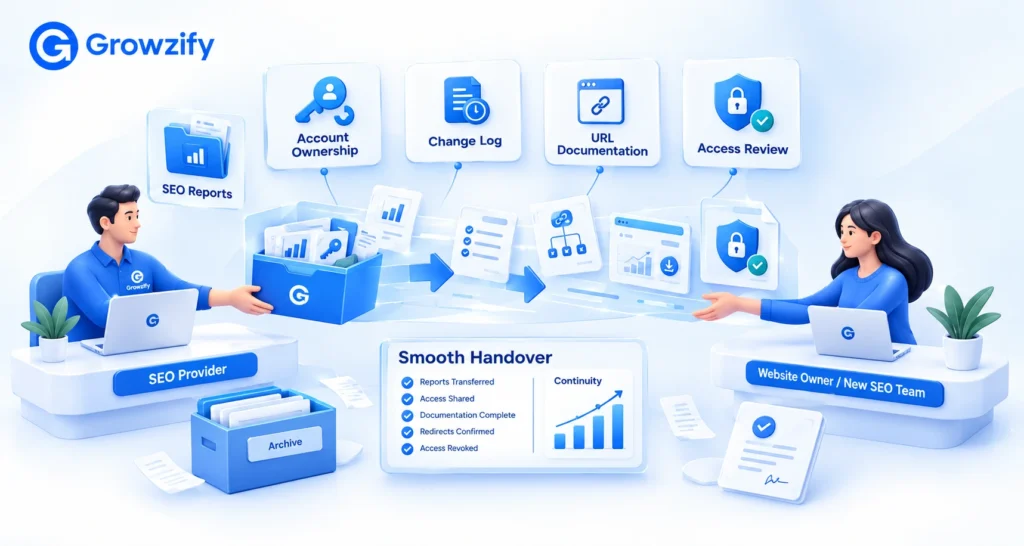
Every outsourcing relationship ends at some point. A clean exit protects your rankings. A messy one puts them at risk.
Put these points in the contract or working agreement:
Review users, verification methods, API credentials, integrations, and any subcontractor access, not only the visible user list. Removing a person from Search Console doesn’t remove every route into your accounts.
Also document external assets the provider managed: outreach and link placements, listings and profiles, and content published off-site. Record who owns each account. You don’t need to keep every link forever, but you do need to know what exists.
If you’re an agency using a white-label partner, the contract matters even more. Growzify’s guide on what a good white label SEO contract should include covers ownership, exit terms, and more.
Moving from one provider to another is a common time for rankings to slip. Changing providers isn’t itself a Google ranking signal. The risk comes from what changes, or gets lost, during the transition.
Use the same steps, in this order:
Switching isn’t risky because of the new provider. It’s risky because things get lost in the gap.
Everything above applies, with one extra layer. You answer to your client, so you need proof that the work is safe.
White-label fulfillment can externalize execution, but it doesn’t externalize your responsibility for approval, QA, and client communication.
Add these checks:
Growzify’s white label SEO quality control checklist covers how to review partner work before it reaches a client.
Can you outsource SEO without losing rankings?
Yes, but outsourcing doesn’t remove the need for internal control. Keep ownership of core accounts and data, establish a baseline, require approval and validation for material site changes, document URL moves and removals correctly, prohibit policy-violating methods, monitor priority page groups, and define the exit process before the relationship ends.
Can outsourcing SEO hurt my rankings?
It can, but usually because of a specific preventable problem, not outsourcing itself. Common causes are unreviewed site changes, missing redirects, risky tactics, or lost access. Rankings can also move for reasons unrelated to the provider. Each preventable cause has a safeguard, as covered in the steps above.
Should every deleted page be redirected?
No. Redirect a URL when the content has moved, merged, or has a genuinely relevant replacement. If content has been permanently removed with no appropriate replacement, an honest 404 or 410 can be the correct response. Avoid redirecting unrelated removed pages just to preserve a URL.
What access should an SEO provider have?
Give the lowest access that lets them do the work. Google advises granting only read access to Search Console when an SEO offers an audit. Use individual accounts with multi-factor authentication where supported, and keep ownership of your domain, Search Console, and Analytics.
How long should I keep redirects after changing URLs?
Google says to keep redirects for as long as possible, generally at least one year.
Will my rankings drop if I switch SEO providers?
Not necessarily. Changing providers isn’t itself a Google ranking signal. The risk comes from what changes or gets lost during the transition, such as content, redirects, access, or tracking. Securing your accounts and taking a baseline first lowers that risk.
How do I know a provider isn’t using risky tactics?
Ask for their methods in writing, check references, and approve any outreach or content published in your name. Google warns that spam-policy violations can lower rankings or remove pages from results.
What should I do if rankings drop after a change?
First decide whether it’s a critical incident, such as a manual action, an accidental noindex, or broken redirects, which needs immediate investigation. Then check the change log for what shipped before the drop, validate the suspected cause technically, and compare against your baseline before assuming an algorithm cause.
If you’re an agency that wants a delivery partner with clear change control and reporting built in, Growzify’s white label SEO services team can walk through how that works.

At Growzify, we are dedicated to helping your business achieve its goals. Are you Ready to take the next step?
Call Now






Growzify digital team is very effective, and easy to work with. Very strong communication and always up for suggestions. Saw 300% growth in web traffic 170% growth in revenue through Facebook ad’s & Amazon. I recommended them to my fellows and they turned their online business into a money making machine.