The Complete Guide to White Label SEO Onboarding for Agencies and Resellers
The Complete Guide to White Label SEO Onboarding for Agencies...
Read More →

A report can look beautiful and still be wrong. The tools, the metric definitions, and the checks behind it are what make a white label SEO report trustworthy.

White label SEO reporting is the practice of delivering SEO performance reporting under your agency’s brand, while the underlying provider or reporting platform stays behind the scenes. The client sees your logo, your layout, and your explanations, and data sources such as Google Search Console or Google Analytics can still be named so clients understand where each metric comes from. Report layout, cadence, and client communication are covered separately in Growzify’s guide to the white label SEO reporting structure.
Methodology : This guide draws on Google’s Help and Search Central documentation for Search Console metrics, the Search Console data anomalies log, the Core Web Vitals report, the Generative AI performance report, Google Analytics key events and the AI Assistant channel, and using Search Console with Analytics, plus Google’s Data Studio release notes, alongside patterns Growzify sees in white label reporting. We don’t review or rank specific commercial reporting tools, because their features change often and we haven’t verified them.
White label reporting can combine several data sources and tools. It helps to think in categories, not brand names.
| Tool category | What it does | Typical use |
| Search platform tools | Show how your site performs in search | Google Search Console |
| Web analytics | Show what visitors do on the site | Google Analytics |
| CRM and sales data | Show whether leads become qualified pipeline, sales, or revenue | Your CRM or sales system |
| Delivery and change tracking | Show what work was completed or deployed | Project management, change logs, publishing logs |
| Dashboard and reporting tools | Combine data and apply your branding | Google’s dashboard tool, or paid agency reporting platforms |
| Rank trackers | Check keyword positions on a schedule | Third-party tracking tools |
| Crawlers and audit tools | Find technical issues | Site audit software |
| Backlink tools | Estimate link profiles | Third-party link databases |
A trustworthy report distinguishes three things that are often mixed:
A dashboard isn’t a data source.
Search Console and Google Analytics are useful first-party sources for search visibility and on-site behavior. They answer different questions, as a later section explains.
For dashboards, Google’s Data Studio is a reporting layer with a no-cost self-service tier. Google’s release notes say Looker Studio was rebranded as Data Studio on April 16, 2026, so older documentation and links may still use the Looker Studio name. Google also sells a paid Pro tier.
Google’s Search Central guidance notes that you can blend Search Console and Analytics data in the dashboard tool using its blending feature.

If you need more than free tools provide, compare options against a short list of criteria.
Don’t rely on a vendor’s marketing page for these. Test each tool with a controlled test account, or connect a real client account only after reviewing permissions, privacy, security, retention, and contractual requirements.
This is a practitioner guide, not a rule. No specific vendor ranking is needed to make the decision.
| Situation | Reasonable starting point |
| Few clients, simple sources, manual commentary is fine | Free Google tools and a dashboard template |
| More clients, scheduled reports, client portals, or more integrations | A paid agency reporting platform |
| Large multi-source portfolios, long retention, CRM and revenue integration, or governance requirements | A custom BI or data warehouse setup |
Rank trackers and backlink tools are useful, but they’re not Google. Google says third-party tools don’t have access to Google’s internal ranking data, and that their predictions are their own. So identify third-party metrics clearly in your reports, and explain that they come from the tool’s own dataset and methodology.
A third-party visibility score is a tool-specific estimate, not Google’s internal ranking data.
A report should separate four performance levels:
Delivery → Technical and Search State → Search Performance → Business Performance
These layers aren’t interchangeable. Publishing ten pages is evidence of delivery. More impressions are a Search outcome. More qualified leads are a business outcome. One doesn’t automatically prove the next.
Completed work is delivery evidence, improved search visibility is a performance outcome, and leads or revenue are business outcomes. Don’t report them as though they’re the same thing.
Reports go wrong when the same word means different things to different people. Define each metric once and use the same wording every time.
Here’s a starter glossary. The Google definitions come from Google’s own documentation.
| Metric | Source | What it means | Watch out for |
| Clicks | Search Console | How often someone clicked a link from Google to your site | Not the same as sessions |
| Impressions | Search Console | How often someone saw a link to your site on Google | Counting rules vary by result type, and an impression isn’t a pageview or a website visit |
| CTR | Search Console | Clicks divided by impressions | Affected by position and result type |
| Average position | Search Console | The topmost position of a link from your property, averaged across queries | Position depends on query, location, device, layout, and aggregation, so don’t treat a sitewide average as one universal ranking |
| Sessions | Google Analytics | A period of time during which a user interacts with your website or app | Differs from clicks |
| Key events | Google Analytics | Events that measure actions particularly important to the success of your business | Only as good as your setup |
| Conversions | Google Analytics | Important actions built from Analytics events, measured consistently across Analytics and Google Ads | Report with the exact definition and attribution scope |
| Core Web Vitals | Search Console | Page experience measures shown in the Core Web Vitals report | See below |
| Rankings | Rank tracker | Estimated position for chosen keywords | Varies by location, device, and tool |
| Backlinks | Third-party tools | Link counts from the tool’s own database | Not Google data |
For each metric, also record its scope: the event definition, attribution model, channel scope, and reporting window. “47 conversions” can mean different things depending on configuration.
In Google Analytics, the two terms aren’t interchangeable. Google defines a key event as an event that measures an action that’s particularly important to the success of your business.
A conversion is built from an Analytics event and offers a consistent way of measuring important actions across Analytics and Google Ads. Google also says conversions let you measure important actions that originate from organic channels like search.
For SEO reporting, key events are usually the clearest way to describe important on-site business actions. If the organization also uses Analytics conversions for cross-channel or advertising measurement, report them with their exact definition and attribution scope rather than treating “key event” and “conversion” as the same term.
The search console performance report has a few details that matter for reporting.
So avoid copying the last day or two into a client report as if it were final. Use complete reporting periods wherever practical.
Page experience often appears in technical sections. Google’s documentation gives the “good” thresholds for the three Core Web Vitals:
| Metric | What it measures | “Good” threshold |
| Largest Contentful Paint (LCP) | Loading | Within 2.5 seconds |
| Interaction to Next Paint (INP) | Responsiveness | Under 200 milliseconds |
| Cumulative Layout Shift (CLS) | Visual stability | Under 0.1 |
These aren’t single-test scores. The core web vitals report in search console uses real-world data from the Chrome User Experience Report and groups URLs that have a similar user experience. Its definitions use the 75th percentile over the last 28 days, and each device type is classified separately.
The report isn’t a comprehensive list of every page. Only indexed URLs with enough data appear, so don’t use it as an inventory of all your pages.
So report the status and the trend, and say that the values reflect real-user data rather than a one-off lab test.
Many clients now ask about AI search. Separate three kinds of measurement, because they answer different questions.
A Google generative-AI impression, an AI-assistant referral visit, a citation, a brand mention, and a conversion are different events. Don’t combine them into one “AI visibility” number.
This is a common source of confusion in client reporting. Google addresses it directly in its guidance on using Search Console and Google Analytics data for SEO.
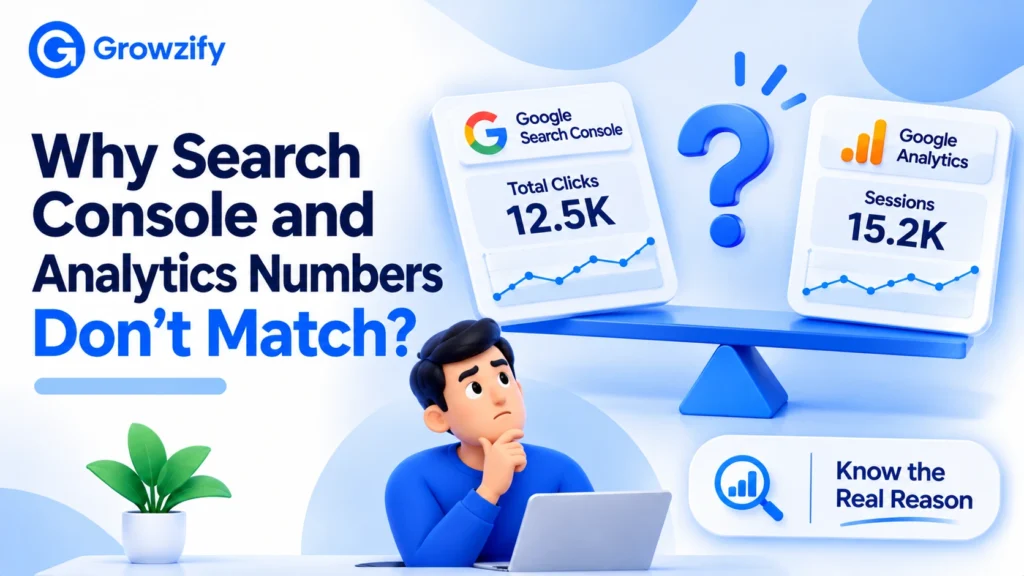
Google explains that clicks and sessions are calculated differently. Other reasons include:
Google’s recommendations are practical:
Don’t force the two systems to reconcile into one invented number. Write these rules into your reporting notes, so every team member explains the gap the same way.
This is an illustration, with made-up numbers, not a real client case. “Northwind Digital” is a fictional agency preparing a monthly report.
Search Console shows 1,200 organic clicks for a service page group. Analytics shows 1,050 organic sessions for the same pages.
A new account manager wants to hide one of the numbers. The senior strategist points to Google’s guidance instead. The report keeps both, with a short note.
| Item | Wording in the report |
| Search Console clicks | “1,200 clicks from Google Search to these pages (Search Console).” |
| Analytics sessions | “1,050 organic sessions on these pages (Google Analytics).” |
| Note | “These tools count different things, so totals differ. Both show the same upward trend since last quarter.” |
The client sees the difference explained, not hidden. The report also states which tool answers which question.
In a white label setup, data work is shared, and each party has a distinct job:
Automation can assemble a report, but it can’t own the interpretation. Both sides check quality.
For ownership, cadence, and client presentation, see the reporting structure guide linked above. The rest of this guide stays on accuracy.
SEO data is rarely clean. Rankings can move for reasons that aren’t immediately attributable to one identifiable cause, and different tools may show different views of performance.
When you can’t explain a change, say so. Describe what you checked, what you ruled out, and what you’ll look at next. Being explicit about uncertainty is safer than giving a confident explanation that the available evidence doesn’t support.
Be precise about what each statement claims:
Don’t call attributed revenue incremental revenue without evidence.
Before attributing a sudden change to SEO work, check Google’s search console data anomalies log for known reporting issues. In 2026, for example, it recorded a logging error that lowered Generative AI performance report impressions for part of August, which Google later restored.
For the review step, Growzify’s white label SEO quality control checklist covers how to check partner work before it reaches a client.
Run through these before every report goes out.
It’s the practice of delivering SEO performance reporting under your agency’s brand while the provider or reporting platform stays behind the scenes. Data sources like Search Console and Analytics can still be named so clients understand where each metric comes from.
A strong white-label SEO report separates four layers: work delivered, technical and search state, search performance, and business outcomes. Each metric should name its source and definition, so clicks aren’t confused with sessions, key events aren’t confused with conversions, and third-party rank or backlink estimates aren’t presented as Google data.
White label reporting can combine Google Search Console and Google Analytics with a dashboard or reporting tool for branding and delivery. CRM data, delivery logs, rank trackers, crawlers, and backlink tools can supply additional data.
Include the metrics tied to the client’s goals. Common ones are Search Console clicks and impressions, organic sessions and key events, Core Web Vitals status, and work completed. Identify rank and backlink figures as coming from third-party tools.
Because they measure different parts of the journey and use different collection, attribution, and URL rules. Search Console is Google’s source for Search performance. Google Analytics measures behavior on the website. Compare matching filters and overall trends instead of expecting clicks and sessions to reconcile exactly.
A key event measures an action that’s particularly important to your business. A conversion is built from an Analytics event and offers a consistent way of measuring important actions across Analytics and Google Ads. For SEO reporting, report each with its exact definition and attribution scope.
It can be, for simple needs. Search Console and Google Analytics can provide the underlying first-party data, while Google’s Data Studio, which has a no-cost self-service tier, can combine and visualize it in a branded dashboard. Paid platforms may add scheduling, client portals, integrations, and agency-specific controls.
Yes, with care. Search Console’s Generative AI performance report shows impressions in AI Overviews and AI Mode, but not clicks or queries. The Analytics AI Assistant channel covers recognized assistant referral traffic, and prompt monitoring is directional. Keep the three separate.
If you’re an agency that wants SEO delivery and reporting data that fit cleanly into your own branded reports, Growzify’s white label SEO services team can walk through how that works.

Chitranshu Sharma A growth strategist, digital marketing consultant, and the founder of Growzify, a performance-driven agency helping brands dominate search, shape perception, and build sustainable online visibility. With 8+ years of hands-on experience in Enterprise SEO, Online Reputation Management (ORM), and AI-led traffic generation, Chitranshu has helped startups, public figures, SaaS companies, and cannabis brands outrank competitors — ethically and at scale.

At Growzify, we are dedicated to helping your business achieve its goals. Are you Ready to take the next step?
The Complete Guide to White Label SEO Onboarding for Agencies and Resellers A lot of...
How SEO Outsourcing for Startups Helps in Driving Organic Growth A startup rarely has enough...
How Much Does SEO Outsourcing Cost in 2026? Nobody can give you one honest price...
AI SEO Best Practices to Boost Visibility Across LLMs Large language models do not all...
7 AI SEO Content Optimization Strategies to Improve Visibility on AI Search Platforms AI-powered search...
How to Outsource SEO Without Losing Your Rankings Rankings don’t vanish because someone else is...
AI SEO vs Traditional SEO: The Comparison Guide Most “versus” articles frame two rival camps....
How to Rank Ecommerce Sites: Strategies That Actually Work Home Blog SEO How to Rank...
Call Now






Growzify digital team is very effective, and easy to work with. Very strong communication and always up for suggestions. Saw 300% growth in web traffic 170% growth in revenue through Facebook ad’s & Amazon. I recommended them to my fellows and they turned their online business into a money making machine.