



How to Fix Core Web Vitals and Page Speed for an Enterprise Website
Enterprise Core Web Vitals optimization focuses on fixing shared templates, scripts, media, and infrastructure issues that affect thousands of pages at once. Improving these systems helps create faster load times, smoother interactions, a stronger user experience, and more consistent search performance.

Written byChitranshu Sharma
August 31, 2026
Quick Nav
Large enterprise websites often share templates, code, images, and infrastructure across thousands of pages, so one performance issue can affect entire sections of the site. Fixing Core Web Vitals starts with identifying these shared issues and understanding which templates and user groups are failing real-world performance thresholds.
Methodology: This guide combines Google Search Central, Chrome/web.dev performance documentation, and recurring patterns observed in Growzify enterprise SEO reviews. Our observations are presented as operational experience rather than Google-confirmed ranking mechanisms. Examples are illustrative unless explicitly identified as client results.
A performance defect in a shared enterprise template can affect tens of thousands of URLs simultaneously. That makes Core Web Vitals optimization less a page-by-page exercise and more a matter of identifying which shared component, dependency, infrastructure layer, or release is responsible for the cohort of failing URLs.
Whether they’re shopping online, reading an article, or comparing services. Even a small delay can lead to frustration and cause them to leave before the page fully loads. Imagine clicking on an e-commerce product page that takes five seconds to appear. Many users may leave rather than wait for the page to become usable. They’ll simply visit the other website where they get a better user experience.
This is whereGoogle Search Console’s Core Web Vitals reportbecomes especially useful at enterprise scale. It shows real-user performance and groups similar pages, making it easier to spot whether an issue is coming from a shared template or component. I’d use Search Console to identify the problem, PageSpeed Insights to investigate it, and then monitor the field data again after deployment. At the enterprise level, the real win is turning Core Web Vitals into an ongoing improvement process.
That’s why Core Web Vitals and page speed have become essential for user experience and SEO. For large, complex websites with thousands of pages, improving performance isn’t about fixing individual pages. It’s about optimizing shared templates, reducing technical bottlenecks, and creating a scalable performance strategy that benefits the entire website. Even a small improvement in page speed can translate into significant business value.” Let’s understand how to fix the Core Web Vitals and other issues of a complex website.
What are Core Web Vitals and why they matter for Enterprise Websites
Core Web Vitals measure how quickly users can load, interact with, and comfortably view a webpage. While these metrics are important for every website, their impact becomes significantly greater as websites grow.
For enterprise organizations, performance issues rarely affect a single page.
Performance problems can originate in shared templates, reusable components, third-party integrations, and infrastructure used across thousands of URLs.
For example: A slow hero image template may delay the loading of every product page. An unoptimized JavaScript library can reduce responsiveness across the entire website.
Improving Core Web Vitals helps organizations:
- Deliver faster experiences for users.
- Improve engagement and reduce bounce rates.
- Increase conversions and completed purchases.
- Improve server and rendering efficiency in ways that may also support crawling efficiency on very large sites.
- Strengthen organic search visibility.
- Support better mobile performance.
- Reduce technical debt across future releases.
Enterprise SEO teams therefore treat Core Web Vitals as an ongoing performance strategy rather than a one-time optimization project.
How Core Web Vitals Affect Business Performance
Page speed influences much more than technical SEO. A faster website allows customers to browse products, compare services, complete purchases, and find information without frustrating delays. When pages load slowly, visitors are more likely to leave, engagement decreases, and potential sales can be lost. Below are some ways page speed can affect your website’s performance, user experience, and overall business growth.
- Higher bounce rates
- Lower conversion rates
- Reduced customer satisfaction
- Fewer returning visitors
- Lower engagement
- Missed revenue opportunities
For enterprise organizations managing millions of monthly visits, even a small improvement in page speed can translate into significant business value. If customers can quickly find products, move through the aisles, and check out without waiting, they’re more likely to complete a purchase.
If every aisle is crowded, signs are confusing, and checkout lines move slowly, many shoppers simply leave. Your website works the same way.
Core Web Vitals help ensure visitors experience a fast, smooth, and frustration-free journey from their first click to their final conversion.
Understanding the Three Core Web Vitals
Google measures three Core Web Vitals to evaluate how users experience a webpage. Together, these metrics answer three simple questions:
For enterprise websites, improving these metrics means improving the experience across thousands of pages instead of fixing individual URLs.
Largest Contentful Paint (LCP)
Largest Contentful Paint (LCP) measures how long it takes for the main content of a page to become visible. This could be a hero banner, featured image, product photo, or large block of text. Google’s recommended “good” threshold is LCP at or below 2.5 seconds at the 75th percentile of page loads.
| Metric | Good | Needs Improvement | Poor |
| LCP | ≤2.5s | >2.5s–4.0s | >4.0s |
| INP | ≤200ms | >200–500ms | >500ms |
| CLS | ≤0.1 | >0.1–0.25 | >0.25 |
Simply put, LCP answers: “How quickly can visitors actually see the important content?” Imagine opening an ecommerce website to buy a laptop. The navigation loads instantly, but the product image and “Buy Now” button take another four seconds to appear.
Even though the page technically started loading, customers still feel like they’re waiting. This delay often causes visitors to abandon the page before engaging with it.
How to Improve LCP
Enterprise teams typically improve LCP by:
- Compressing and resizing images
- Prioritizing discovery of critical resources, and using preload selectively where testing shows it reduces resource-load delay.
- Reducing server response time
- Optimizing shared templates
- Removing unnecessary third-party scripts
Interaction to Next Paint (INP)
Interaction to Next Paint (INP) measures how quickly a website responds after a visitor clicks, taps, or types. It evaluates whether the website feels responsive during real interactions. Google recommends an INP below 200 milliseconds.
In simple terms: “When someone clicks something, how quickly does the website react?”
Imagine clicking “Add to Cart.” Nothing happens. Then you click again; still nothing happens. After a few seconds, the two products appear in the cart. The issue was that it simply responded slowly. These delays frustrate users and reduce conversions.
How to Improve INP
Enterprise websites improve responsiveness by:
- Reducing JavaScript execution
- Removing unused scripts
- Splitting large JavaScript bundles
- Loading scripts only when required
- Optimizing checkout functionality
- Deferring non-essential code
Enterprise Example
A retailer discovers that a live-chat widget delays every button interaction. Loading the widget only after the page becomes interactive If performance traces show the chat widget contributing long main-thread tasks during interaction windows, delaying its initialization can reduce that contention across templates where it loads.
Cumulative Layout Shift (CLS)
Cumulative Layout Shift (CLS) measures how much a webpage unexpectedly moves while loading. Google recommends a CLS score below 0.1. In simple words: “Does the page stay stable while loading?”
Imagine reading an article when an advertisement suddenly loads above the text. Everything shifts downward. You accidentally click the advertisement instead of the button you wanted. This creates a frustrating experience.
How to Improve CLS
Enterprise organizations reduce layout shifts by:
- Defining image dimensions
- Reserving space for advertisements
- Preloading fonts, delivering critical fonts early, using an appropriate font-display strategy, and minimizing metric differences between fallback and web fonts to reduce font-related layout shifts
- Avoiding unexpected content insertion
- Using stable layouts
- Testing templates before deployment
Enterprise Example
A publisher reserves dedicated space for advertising containers before ads load. As a result, articles remain stable during loading, improving user experience across thousands of pages.
Think of LCP, INP, and CLS as three quick checks on how a page feels to real users. One shows how fast the main content loads, another measures. It captures the delay from an interaction through browser processing until the next frame is painted.
Together, they help you spot where the experience starts to break down. Improve them consistently, and you create pages that feel faster, smoother, and easier to use across devices and templates.
How to Fix Page Speed Issues at Enterprise Scale
Improving page speed on an enterprise website is rarely about optimizing one image or removing one script. The real opportunity is finding the shared templates, systems, infrastructure, and processes creating performance problems across large groups of pages, then fixing those issues at the source. Here are the key areas to address.
1. Optimize Shared Templates
Enterprise websites often use the same templates across thousands of product, category, article, location, and landing pages. If one shared component is slow, every page using it can inherit the problem.
How to fix it:
- Group URLs by template or page type.
- Identify the slowest shared components.
- Remove unnecessary scripts and resources.
- Optimize reusable modules such as navigation, product cards, filters, and hero sections.
- Test template changes before rolling them out across the full site.
- Validate improvements using field data after deployment.
Example
If thousands of product pages use the same JavaScript-heavy product template, optimizing individual URLs will not solve the underlying problem. Removing unnecessary code from the shared template allows the improvement to scale across the entire affected page group.
2. Optimize Images and Media Delivery
Large media libraries can significantly slow down an enterprise website, especially when oversized desktop images are served to mobile users. This increases unnecessary data transfer, delays loading, and makes consistent image optimization across the site more difficult.
How to fix it:
Build an automated media optimization process that:
- Compresses images before delivery.
- Serves appropriately sized images for different devices.
- Implements responsive images.
- Lazy-loads below-the-fold media where appropriate.
- Avoids lazy-loading critical above-the-fold images such as the LCP element.
- Optimizes video thumbnails and loading behavior.
This is especially important for hero banners, product photography, promotional graphics, lifestyle images, and video-heavy templates.
Example
Instead of manually resizing every product image, an ecommerce site can configure its image pipeline to automatically generate and serve different image sizes based on the visitor’s device. One system-level change can improve media delivery across the entire catalog.
3. Audit and Control Third-Party Scripts
Analytics platforms, chat tools, personalization systems, advertising pixels, testing software, and review widgets can all add JavaScript and network requests. The problem is rarely one tool alone. Performance can gradually decline as more tools are added over time.
How to fix it:
- Create an inventory of every third-party script.
- Identify who owns each tool.
- Measure its loading and main-thread cost.
- Remove scripts that are no longer needed.
- Load non-critical scripts later where possible.
- Review new tools for performance impact before deployment.
- Reassess the inventory regularly.
Example
A retailer may discover that several tracking or marketing tools added over previous campaigns are still loading even though the teams no longer use them. Removing unnecessary scripts reduces page weight and browser processing across every template where those scripts appear.
4. Reduce Heavy JavaScript
A page can appear visually loaded while the browser is still busy executing JavaScript. That can make menus, search, filters, buttons, and checkout interactions feel slow.
How to fix it:
- Load critical JavaScript first.
- Defer functionality that is not immediately required.
- Break large bundles into smaller chunks.
- Remove unused libraries and duplicate dependencies.
- Reduce long main-thread tasks.
- Review which components genuinely need immediate hydration.
- Delay non-essential widgets until they are needed.
Example
Imagine a product page loading analytics, chat, personalization, reviews, recommendations, and tracking tools at the same time. Even if the page looks ready, the browser may still be processing scripts. Prioritizing essential functionality and delaying non-critical code can make interactions feel noticeably faster.
5. Improve Server Response Time
Front-end optimization cannot fully compensate for a slow backend. If the server takes too long to generate or return a page, the rest of the loading process starts late.
How to fix it:
- Identify slow database queries.
- Reduce unnecessary API calls.
- Cache frequently requested data.
- Optimize dynamic page generation.
- Review application and server bottlenecks.
- Monitor response times by template rather than relying only on sitewide averages.
Example
A travel platform may generate destination listings by querying several systems every time a visitor opens a page. Caching frequently requested data and reducing unnecessary backend processing can improve response times across every page using that template.
6. Build a Stronger Caching Strategy
Without effective caching, browsers and servers repeatedly fetch or regenerate resources that have already been requested.
At enterprise scale, that repeated work can create unnecessary latency and infrastructure load.
How to fix it:
Configure caching appropriately for:
- Images
- CSS files
- JavaScript
- Fonts
- Static assets
- API responses where appropriate
- Frequently requested page content
Also review:
- Browser caching rules
- Server-side caching
- Cache invalidation
- Edge caching
- Dynamic content that does not need to be generated on every request
Example
If thousands of visitors request the same product page every day but the backend rebuilds the page and fetches identical information each time, the system is doing unnecessary work. Caching reusable content allows subsequent requests to be served more efficiently.
7. Optimize Fonts
Fonts influence both loading speed and visual stability.
Enterprise websites commonly load:
- Multiple font families
- Numerous font weights
- External font services
How to Fix It
- Using fewer font weights
- Preloading important fonts
- Evaluate self-hosting where it improves control over caching, delivery and privacy requirements; validate the performance effect rather than assuming self-hosting is inherently faster.
- Loading only required character sets
This reduces layout shifts and improves rendering speed.
Example
Suppose an enterprise website uses a custom font across thousands of pages, but the font files are large and load late. Users may briefly see fallback text, then experience a visible shift when the custom font appears. Compressing font files, preloading only critical fonts, and matching fallback font dimensions can reduce layout shifts and improve CLS.
8. Introduce Performance Governance Across Teams
Enterprise page speed is not only an engineering issue. Marketing, product, analytics, ecommerce, regional teams, and developers may all influence what gets loaded on the website.
Without shared standards, small changes from different teams can gradually create a much larger performance problem.
How to fix it:
Establish clear performance governance that includes:
- Shared performance standards.
- Defined owners for major templates and scripts.
- Performance reviews before new third-party tools are launched.
- Performance budgets for key templates.
- Automated checks within development workflows.
- Release-linked performance testing.
- Regular audits of scripts, plugins, and shared components.
Example
Marketing may add a tracking platform while product adds personalization and engineering introduces a new front-end library. Each decision may look reasonable independently. A shared performance review helps teams understand the combined impact before those changes reach thousands of pages.
Enterprise page speed improveswhen teams stop treating every slow URL as a separate problem. The bigger opportunity is identifying the template, component, script, backend process, or organizational workflow creating the slowdown.
Fix the source, validate the improvement with real-user data, and the performance gain can scale across entire sections of the website.
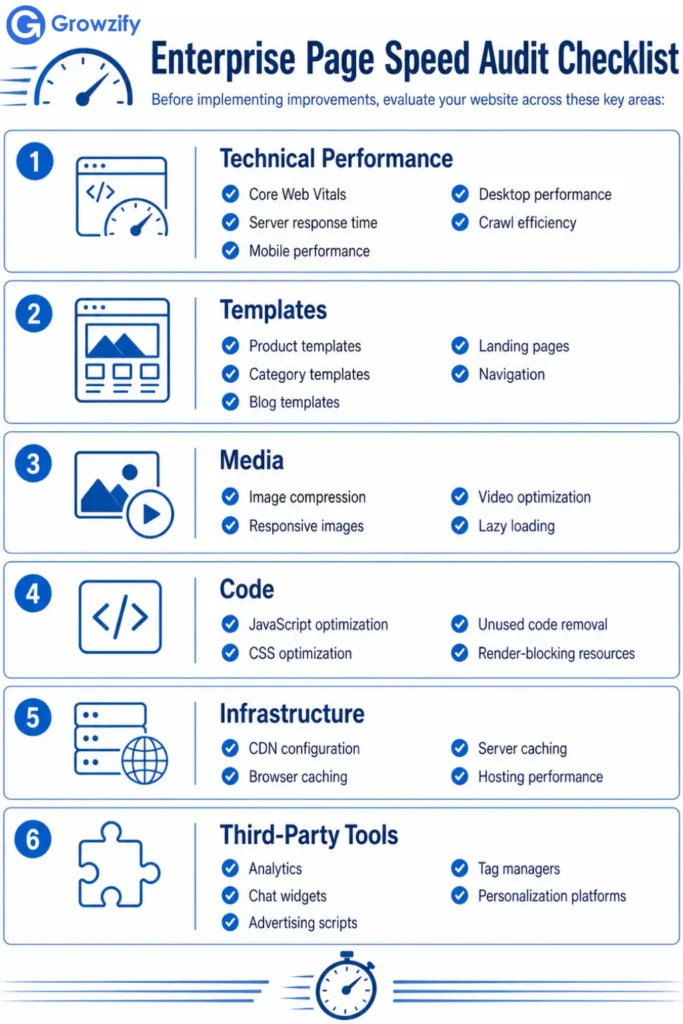
Enterprise Performance Optimization Workflow
Improving performance on a large website is not a one-time project. As templates, content, scripts, and platform features continue to change, new performance issues can appear. A repeatable workflow helps teams find problems early, prioritize the right fixes, and prevent improvements from being lost after future releases.
- Identify Performance Issues: Use field data, lab testing, monitoring tools, and template-level analysis to locate the real bottlenecks.
- Measure Enterprise Performance Correctly Before Fixing It
| Data type | Examples | Best use |
| Field data | CrUX, PageSpeed Insights field section, RUM | Determine what real users experience |
| Lab data | Lighthouse, DevTools, WebPageTest | Reproduce and diagnose specific problems |
| RUM | Internal real-user monitoring | Segment performance by template, market, device, release, logged-in state |
| Synthetic monitoring | Scheduled test runs | Detect regressions consistently before/after releases |
Use field data to determine whether users have a problem. Use lab data to investigate why the problem is happening.
- Prioritize High-Impact Fixes:Focus first on issues affecting important templates, large URL groups, or critical user journeys.
- Optimize Shared Templates:Fix common components and template logic so improvements can scale across thousands of pages.
- Optimize Images, CSS, JavaScript, and Fonts:Reduce unnecessary page weight, rendering delays, and main-thread work.
- Validate Before Release:Test changes on representative templates and devices before wider deployment.
- Deploy and Monitor: Track real-user performance after release and watch for unexpected regressions.
- Continuously Improve:Use new performance data, releases, and user behavior to guide the next round of optimization.
A structured workflow turns page speed from an occasional cleanup task into an ongoing performance. An enterprise system that discipline that supports faster, more consistent experiences as the website grows.
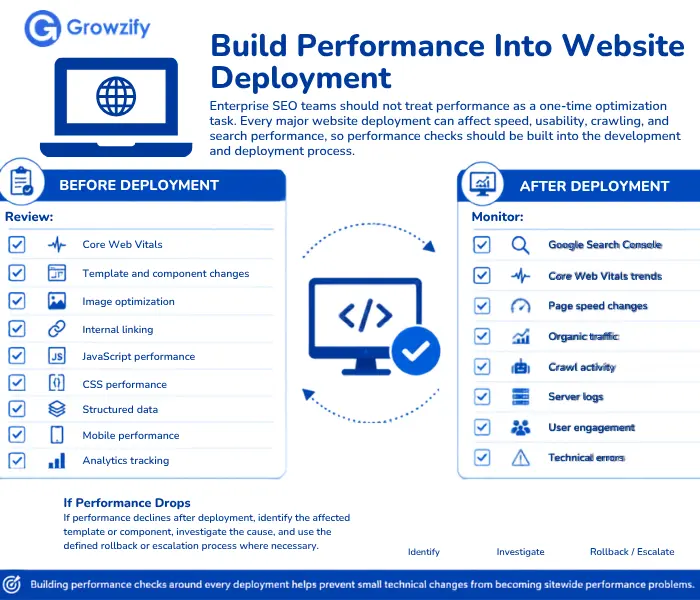
Make Performance a Long-Term Enterprise Priority
Core Web Vitals are technical performance metrics, but they also reflect important aspects of how users experience a website. They’re a reflection of how customers experience your website. Forenterprise organizations,improving page speed means optimizing the shared systems that power thousands of pages rather than making isolated fixes.
By investing in efficient templates, optimized media, streamlined code, scalable infrastructure, and continuous monitoring, businesses can create faster websites that support stronger SEO, better user experiences, and long-term digital growth.
The goal isn’t simply to achieve a perfect PageSpeed score. It’s to build a high-performing website that scales with your business, delights users, and consistently delivers measurable business results.
Frequently Asked Questions
Why are Core Web Vitals important for enterprise websites?
Large websites share templates and infrastructure across thousands of pages. Improving Core Web Vitals at the template level enhances performance across the entire website while supporting SEO, user experience, and conversions.
Which Core Web Vitals should I improve first?
There is no universal metric to fix first. Prioritize the metric with the clearest failure, greatest affected-template reach, strongest business importance, highest confidence in the root cause, and realistic implementation effort.
Does page speed affect SEO?
Yes, but page speed should not be treated as a standalone ranking lever. Google uses Core Web Vitals within its broader ranking and page-experience systems, while relevance and content quality remain fundamental. Strong Core Web Vitals scores do not guarantee higher rankings.
How often should enterprise websites review Core Web Vitals?
Performance should be monitored continuously. Core Web Vitals should also be reviewed before and after major website releases, migrations, redesigns, or template updates.
Can improving page speed increase conversions?
It can. Faster experiences can reduce friction during important user journeys such as browsing, checkout, and form completion, although the commercial impact varies by website, audience, and conversion path.
How long after a fix will Core Web Vitals field data improve?
Lab results can change immediately after deployment, while CrUX-based field reporting reflects aggregated real-user data over a rolling period and therefore updates more slowly.
Should we fix every URL individually?
Usually not on a large templated site. Diagnose by URL group/template, identify the shared cause, fix it at source, then validate representative pages and population-level field data.

Chitranshu SharmaA growth strategist, digital marketing consultant, and the founder of Growzify, a performance-driven agency helping brands dominate search, shape perception, and build sustainable online visibility. With 8+ years of hands-on experience in Enterprise SEO, Online Reputation Management (ORM), and AI-led traffic generation, Chitranshu has helped startups, public figures, SaaS companies, and cannabis brands outrank competitors — ethically and at scale.
Explore More Articles

How to Find and Compare Local SEO Outsourcing Providers
How to Find and Compare Local SEO Outsourcing Providers Finding a local SEO outsourcing provider...
October 13, 2026Outsourcing

Inside a White Label SEO Campaign: How the Work Gets Done
Inside a White Label SEO Campaign: How the Work Gets Done Clients see a single...
October 13, 2026White Label

How to Vet an SEO Outsourcing Provider Before You Sign a Contract
How to Vet an SEO Outsourcing Provider Before You Sign a Contract A polished proposal...
October 9, 2026Outsourcing

Multilingual SEO Best Practices: Optimize Your Multi-Language Website
Multilingual SEO Best Practices: Optimize Your Multi-Language Website Translating a page and localizing it for...
October 7, 2026SEO

What Makes In-House Enterprise SEO Work Different Day-to-Day?
What Makes In-House Enterprise SEO Work Different Day-to-Day? On a small site, deciding to fix...
October 7, 2026Enterprise

How Core Algorithm Updates Impact Large Sites Differently Than Small Ones
How Core Algorithm Updates Impact Large Sites Differently Than Small Ones A large enterprise site...
October 7, 2026Enterprise

When Should You Outsource SEO? 11 Signs It Makes Sense
When Should You Outsource SEO? 11 Signs It Makes Sense Outsourcing SEO does not necessarily...
September 26, 2026Outsourcing